> For the complete documentation index, see [llms.txt](https://docs.cogram.com/llms.txt). Markdown versions of documentation pages are available by appending `.md` to page URLs; this page is available as [Markdown](https://docs.cogram.com/field/field-on-the-web.md).
# Field on the web
Review field reports and observations in the web app, export them as Word or CSV files, and extract observations from meeting recordings.
Capture happens on your phone; review and export happen at your desk. The Field module in the web app's left sidebar holds your reports, observations, and drawings, and this is where the finished documents come out.
## Reviewing reports
Open [Field > Reports](https://app.cogram.com/dashboard/reports) and click a report to review it. The report page has tabs for the overview, its observations, and its drawings, and shows Cogram's summary of the findings.
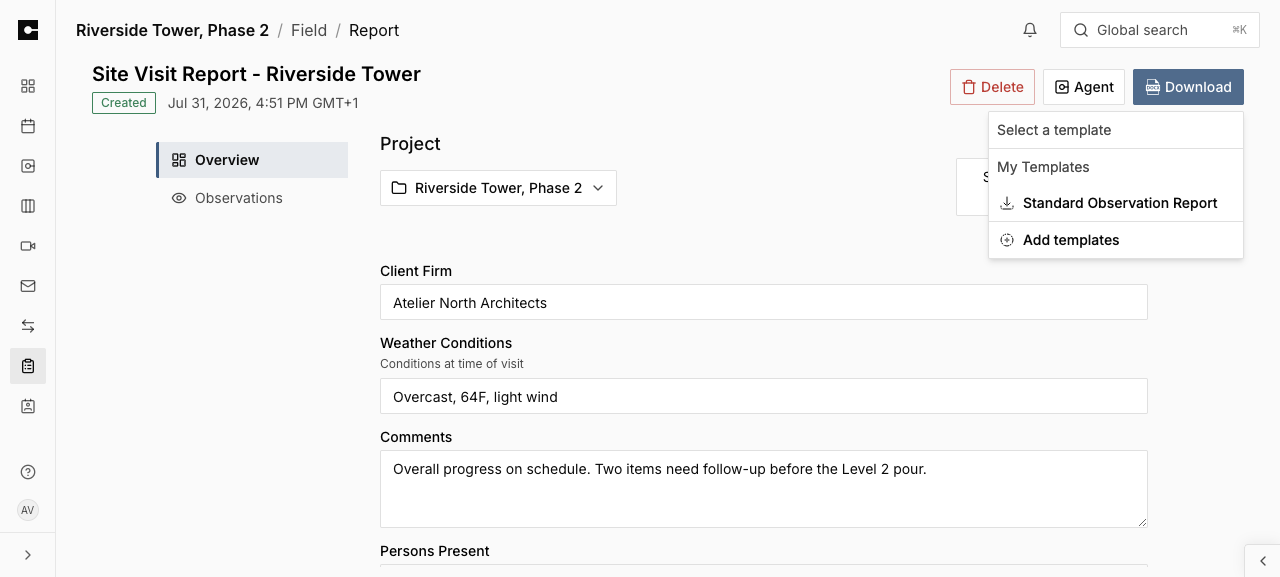
To export the report, click **Download** and pick a template under **Select a template**. Your organization's layouts appear under **My Templates**. The Word document fills in the report's details and observations per its [Report Type](/field/report-types.md). To export several reports at once, select them in the list and use **Download selected reports**.
Exporting a report: Download, then pick a template
Your admin manages the layouts under [Word templates](/meetings/templates.md).
### Changing a report's type
Picked the wrong report type in the field? On the report page, click **Change type** and select the correct one. Fields with the same name keep their values, and the export switches to the new type's templates. Values that don't exist on the new type are kept but hidden, and they come back if you switch the report back to its old type. The report's creator and organization admins can change the type at any time, even after the report is completed.
## Reviewing observations
Open [Field > Observations](https://app.cogram.com/dashboard/reports/observations) for every observation across your projects, with filters. Click one to review or edit it: the type, status, notes, and photo captions can all be updated after capture, so cleaning up field notes at your desk is normal.
Two exports live on this list:
* **Download CSV**: the observation list as a spreadsheet, for tracking in Excel.
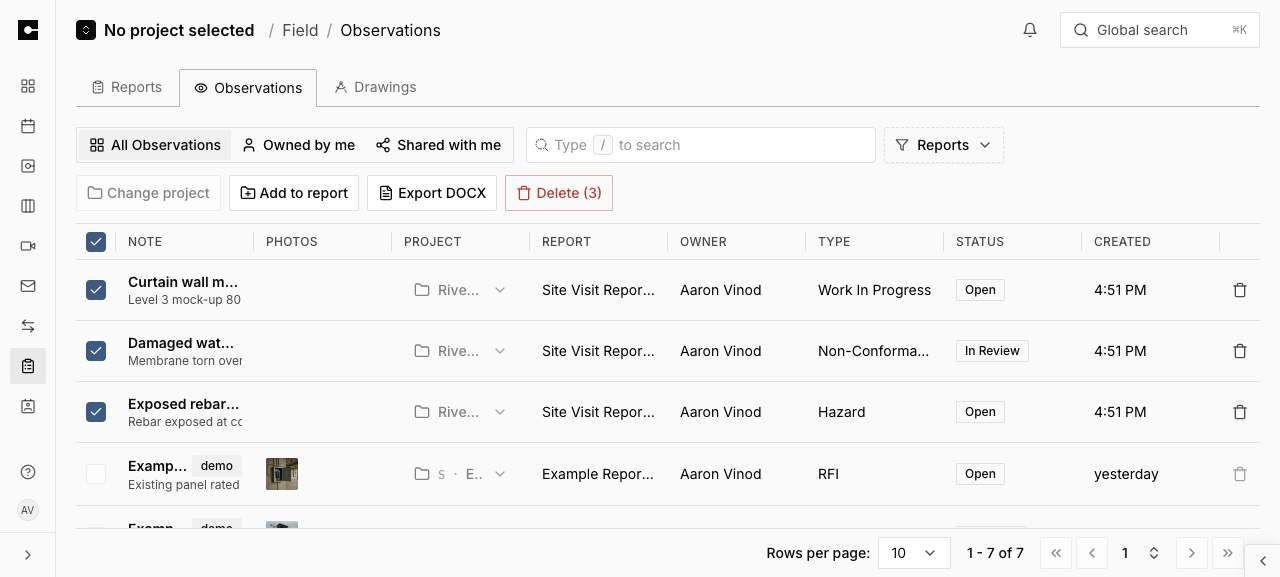
* **Export DOCX**: select observations first, and the toolbar offers **Export DOCX** (a Word document of the selection) alongside **Add to report**, which groups the selection into a field report from your desk.
The Observations list with a selection: Add to report and Export DOCX
## Extracting observations from a meeting
Walked the site while recording a [meeting](/meetings/in-person-meetings.md)? Cogram can turn what was said into observations. On the meeting's page, click **Extract** and choose:
* **Report with all observations**: creates a field report with the extracted observations already linked.
* **Freestanding observations**: creates the observations on their own, for you to review and group later.
Extraction is AI-powered: review the extracted observations for accuracy, especially names, technical values, and units, before finalizing or sharing a report.
## Drawings and pins
Drawings are managed on the web too: uploads, drawing sets, and bulk edits are covered in [Drawings](/field/drawings.md). On a drawing, you can move an existing observation pin with **Move pin**; placing new pins happens on mobile.
## Related
* [Create a field report on site](/field/field-reports.md): the mobile capture workflow that feeds these pages.
* [Word templates](/meetings/templates.md): the Word layouts reports export against.
* [Drawings](/field/drawings.md): uploading and organizing drawings on the web.
---
# Agent Instructions
This documentation is published with GitBook. GitBook is the documentation platform designed so that both humans and AI agents can read, navigate, and reason over technical content effectively. Learn more at gitbook.com.
## Querying This Documentation
If you need additional information that is not directly available in this page, you can query the documentation dynamically by asking a question.
Perform an HTTP GET request on the current page URL with the `ask` query parameter, and the optional `goal` query parameter:
```
GET https://docs.cogram.com/field/field-on-the-web.md?ask=&goal=
```
`ask` is the immediate question: it should be specific, self-contained, and written in natural language.
`goal` is optional and describes the broader end goal you are ultimately trying to accomplish on behalf of the user. GitBook uses it to tailor the answer towards what is most useful for that goal.
The response will contain a direct answer to the question and relevant excerpts and sources from the documentation.
Use this mechanism when the answer is not explicitly present in the current page, you need clarification or additional context, or you want to retrieve related documentation sections.